This SOP will review how to visit a client’s website to find value propositions, services offered, customer benefits, advantages, etc. We’ll eventually use these headlines and descriptions to write Google Search Ads copy for the client. Depending on the client, website, and brand, this may be easy or something the brand hasn’t defined clearly. Thus, the brand doesn’t don’t do a good job of capturing or presenting the information to users on their site.
In the case where the client doesn’t do a good job communicating their value proposition, we can often look at the competition. When looking at the competition, I recommend looking at competitors in different geographic areas. So we don’t end up borrowing some good headlines or value propositions and end up in a situation where the competitor realizes it.
Outcomes:
- Review the client’s website or meeting notes to understand the client’s value proposition.
- A Google sheet with a list of business descriptors or headlines. Google Ads headlines are limited to 30 characters each, but we won’t worry about how many characters the headlines are at this stage. We want a long list of descriptors, benefits, etc.
Time Needed to Complete Tasks:
60 to 90 minutes
Steps to Complete.
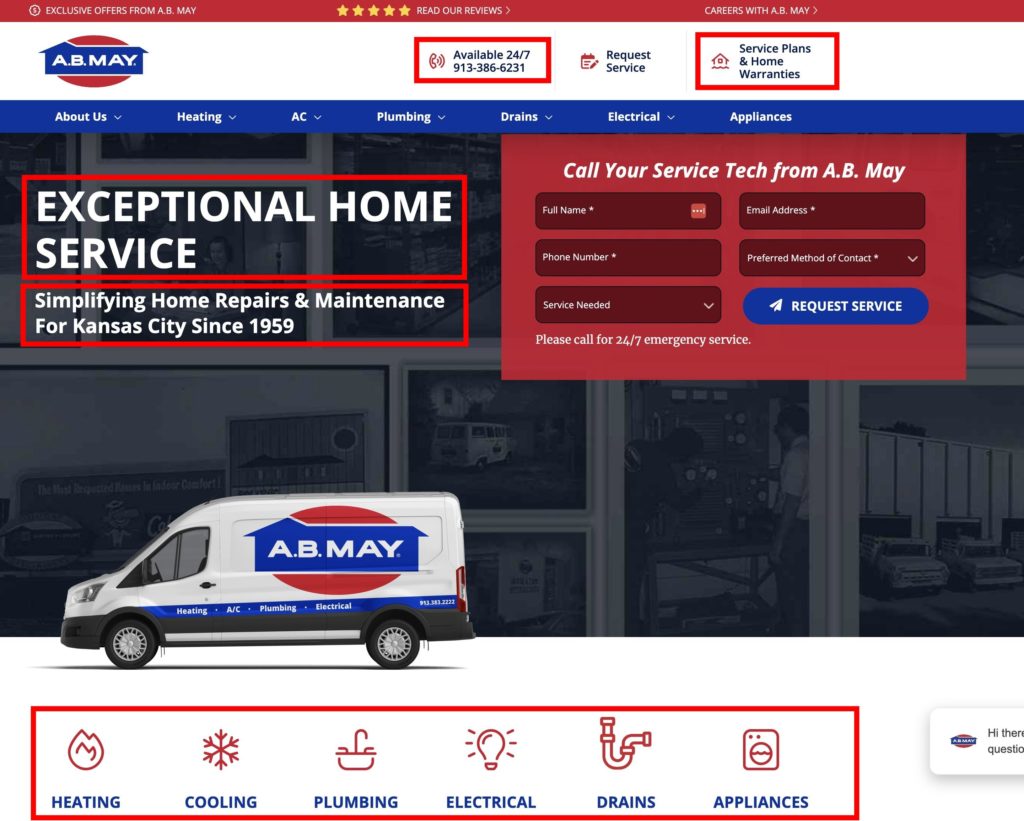
- Visit the client’s website. I’ll use AB May, an HVAC company in Kansas City, as an example.
- Create a new Google Sheet in the client folder. Copy this template, and place it in the client folder. The file should be named year-clientname-descriptors. In this case, 2023-abmay-descriptors.
- Start copying the pasting the descriptors into the file.
In the screenshot below, I’ve circled the client’s descriptors in red.